Burne: A Modern Geometric Sans-Serif Font for Clarity and Versatility
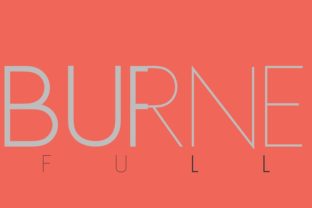
When it comes to choosing a font that communicates clearly and effectively, Burne stands out as a strong contender. This geometric sans-serif typeface is designed with simplicity and precision in mind, making it an excellent choice for a wide range of applications—from branding and web design to print materials and digital content.
Why Burne Matters in Today’s Design Landscape
Burne is more than just another font—it's a carefully crafted solution for designers and creators who value clean lines, readability, and visual balance. Its geometric structure ensures that text remains legible even at smaller sizes, while its minimalist aesthetic lends itself well to modern design trends.
For professionals and hobbyists alike, Burne offers a versatile option that can adapt to various contexts. Whether you're working on a website, a logo, or a marketing campaign, the font’s consistent stroke width and uniform letterforms help maintain visual harmony across different media.
Common Misconceptions About Burne
Despite its strengths, there are several misconceptions about Burne that can lead to poor decisions when selecting or using it. One of the most common is the belief that all geometric sans-serif fonts are interchangeable. In reality, each font has unique characteristics that affect how it performs in different situations.
Another misunderstanding is that Burne is only suitable for certain industries. While it may be less common in traditional print design, its modern appeal makes it a great fit for tech, creative, and digital-focused projects. It’s important to consider the context in which you’ll use the font rather than assuming it fits every scenario.
Mistake 1: Assuming Burne Is Too Basic
Some users dismiss Burne because they think it lacks personality or detail. However, this is a misconception. The font’s simplicity is one of its greatest assets—offering clarity without unnecessary embellishment. This makes it ideal for environments where readability is key, such as data dashboards, user interfaces, and instructional materials.
For example, a small business owner designing a website might choose Burne for their navigation menu or contact information. Its clean appearance ensures that essential information is easy to read and visually uncluttered.
Mistake 2: Not Considering Weight and Style Variations
Burne comes in multiple weights and styles, including regular, bold, italic, and condensed versions. Many users overlook these options, assuming that the standard weight will suffice for all uses.
This oversight can lead to poor typographic results. For instance, using only the regular weight in a headline might make it appear weak or unimpressive. By incorporating bold or italic variations, you can add visual interest and hierarchy to your design.
Practical Tips for Choosing and Using Burne Effectively
Before deciding to use Burne, there are several factors to consider. First, evaluate the purpose of your project. If you need a font that supports multiple languages or special characters, ensure that Burne offers the necessary coverage. Some fonts have limited character sets, which can be problematic for international audiences.
Next, check the licensing terms. Burne is available through various platforms, but not all offer the same level of access. Make sure you understand whether the font is free for commercial use or if you need to purchase a license. This is especially important for freelancers and small business owners who rely on fonts for client work.
Additionally, test Burne in different environments. How does it look on a mobile device versus a desktop? Does it render consistently across operating systems? These questions can help you avoid potential issues with cross-platform compatibility.
Example: Comparing Burne to Similar Fonts
If you’re considering alternatives to Burne, take time to compare it with other geometric sans-serif fonts like Montserrat, Poppins, or Roboto. Each has its own strengths and weaknesses, and the best choice depends on your specific needs.
For instance, if you’re looking for a font with a slightly more rounded feel, Poppins might be a better fit. But if you want something sharper and more structured, Burne could be the right choice. Always test the font in your intended context before making a final decision.
How to Avoid Common Pitfalls When Working With Burne
One of the biggest pitfalls when working with Burne is not accounting for contrast. Since it’s a geometric sans-serif, it can sometimes blend in with surrounding text if not used thoughtfully. To avoid this, pair Burne with complementary colors or backgrounds that enhance its visibility.
Another mistake is overusing the font. While Burne is versatile, it’s not always appropriate for every section of a design. Use it strategically—reserve it for headings, titles, or key elements where clarity and impact are essential.
Finally, don’t neglect the importance of typography hierarchy. Burne’s clean structure means it can be used to create clear visual layers in your design. By varying weight, size, and spacing, you can guide the reader’s eye and improve overall readability.
Final Considerations Before Using Burne
Before committing to Burne, ask yourself a few key questions: Does it align with your brand identity? Will it work across all platforms and devices? Is it accessible for users with visual impairments? These considerations can help you make a more informed decision.
Remember, the goal of any font is to enhance communication, not distract from it. Burne is a powerful tool when used correctly, but it requires thoughtful application. By understanding its strengths and limitations, you can ensure that it serves your design goals effectively.